


Welcome to the US Beekeeping Survey App
Explore honey bee colony loss and management data collected by the US Beekeeping Survey.
Thanks for visiting the US Beekeeping Survey Application! This interactive app displays honey bee colony losses and Varroa management practices reported by beekeepers in the US. Users can apply filters, including survey year, season (annual, summer, winter), state/territory, and operation type (backyard, sideliner, commercial) to update the visualizations. Depending on the selected question, the chart may be shown as a bar chart, line chart, or histogram. A download button, as well as an accessible data table with the full underlying dataset, is available for each chart.
Click the tabs at the top or the cards below to start exploring the app.
To learn about the survey: https://aub.ie/us-beekeeping-survey
To submit feedback or report issues: https://aub.ie/us-beekeeping-survey-feedback
To cite information visualized by the App, use: US Beekeeping Survey, https://aub.ie/us-beekeeping-survey-app
Data source: US Beekeeping Survey
Data curation: N Steinhauer, Z Beneduci, A Giacobino
App designed by: Z Beneduci, A Giacobino, N Steinhauer, G Williams
Last updated 31 March 2026

© US Beekeeping Survey
Download Plot
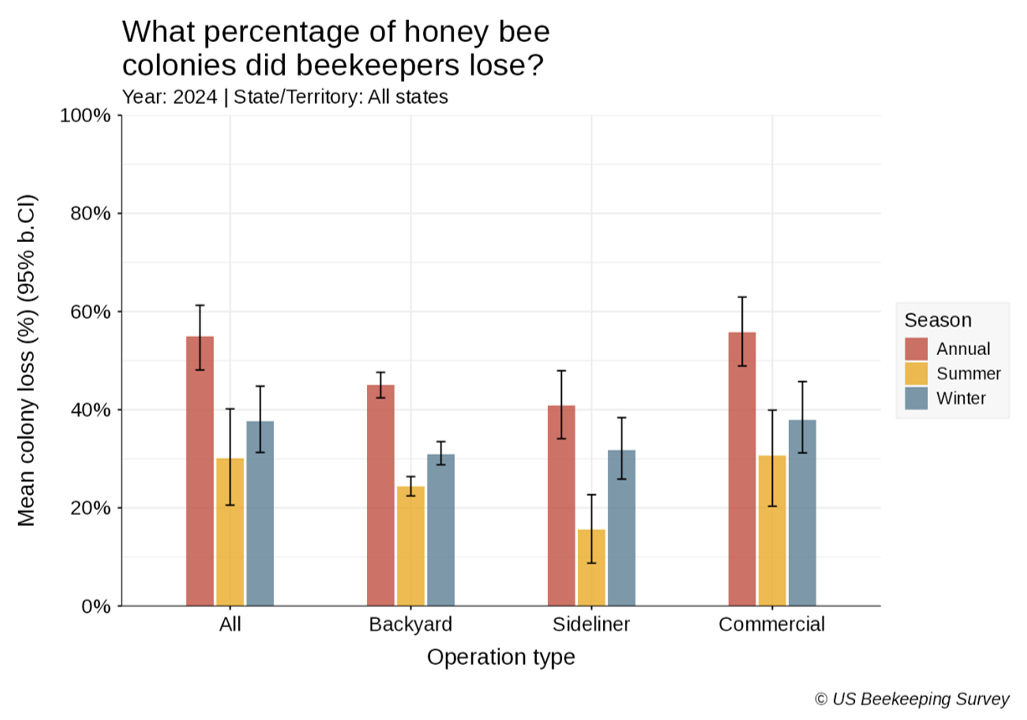
Seasonal managed honey bee (Apis mellifera) colony loss rates (%) by operation type (backyard: 1–50 colonies, sideliner: 51–500 colonies, and commercial: >500 colonies). Error bars represent the 95% confidence interval obtained from a bootstrap resampling of the data (n-out-of-n, 1000 rep). Annual loss covers the whole period from April 1 to the next April 1 (in red); summer (April 1 for backyard or date of the first split reported for sideline and commercial – October 1, in yellow); winter (October 1 – April 1, in blue). Results are shown when 10 or more valid responses per state or territory were recorded.
- Year: The end year of the survey period, running from 1 April to the next 1 April.
- Season: The within-year period of data collection. Annual: April 1 to the next April 1; Summer: April 1 (for backyard) or date of the first split (for sideliner and commercial) to October 1; and Winter: October 1 to April 1 (for backyard) or date of the first split reported (for sideliner and commercial).
- Operation type: The type of operation run by the beekeeper based on the number of managed colonies. Backyard: managing up to 50 colonies; Sideliner: managing 51-500 colonies; and Commercial: managing >500 colonies.
- Cause: The cause of colony loss reported by the beekeeper.
- Respondents: The total number of respondents that answered the relevant survey question.
- Percentage: The percentage of respondents that chose the answer out of the total number of respondents.
- 95% LCL: The lower limit of the 95% confidence interval obtained from a bootstrap resampling of the data (n-out-of-n, 1000 repetitons). [R] represents redacted values due to low sample size (<10 respondents).
- 95% UCL: The upper limit of the 95% confidence interval obtained from a bootstrap resampling of the data (n-out-of-n, 1000 repetitons). [R] represents redacted values due to low sample size (<10 respondents).
Download Plot
Reported causes of honey bee (Apis mellifera) colony loss. Proportions of beekeepers reporting each cause are shown as points (triangles) with bootstrapped 95% confidence intervals represented by lines. Summer season (yellow) covers April 1 to October 1 for backyard operations, or from the date of the first split to October 1 for sideline and commercial operations. Winter season (blue) covers October 1 to April 1 for all operation types (backyard: 1–50 colonies, sideliner: 51–500 colonies, and commercial: >500 colonies).
- Year: The end year of the survey period, running from 1 April to the next 1 April.
- Season: The within-year period of data collection. Annual: April 1 to the next April 1; Summer: April 1 (for backyard) or date of the first split (for sideliner and commercial) to October 1; and Winter: October 1 to April 1 (for backyard) or date of the first split reported (for sideliner and commercial).
- Operation type: The type of operation run by the beekeeper based on the number of managed colonies. Backyard: managing up to 50 colonies; Sideliner: managing 51-500 colonies; and Commercial: managing >500 colonies.
- Cause: The cause of colony loss reported by the beekeeper.
- Respondents: The total number of respondents that answered the relevant survey question.
- Percentage: The percentage of respondents that chose the answer out of the total number of respondents.
- 95% LCL: The lower limit of the 95% confidence interval obtained from a bootstrap resampling of the data (n-out-of-n, 1000 repetitons). [R] represents redacted values due to low sample size (<10 respondents).
- 95% UCL: The upper limit of the 95% confidence interval obtained from a bootstrap resampling of the data (n-out-of-n, 1000 repetitons). [R] represents redacted values due to low sample size (<10 respondents).
Download Plot
Mean honey bee (Apis mellifera) colony loss (%) over time, with 95% confidence intervals, by season. Annual loss covers the whole period from April 1 to the next April 1 (in red); summer (April 1 for backyard or date of the first split reported for sideline and commercial – October 1, in yellow); winter (October 1 – April 1, in blue).
Rank of the most reported perceived causes of honey bee (Apis mellifera) colony loss by operation type (backyard: 1–50 colonies, sideliner: 51–500 colonies, and commercial: >500 colonies). Summer and winter seasons are shown separately. Points indicate the rank of each cause, with overlapping points representing rank ties. Causes are color-coded.
- Year: The end year of the survey period, running from 1 April to the next 1 April.
- Season: The within-year period of data collection. Annual: April 1 to the next April 1; Summer: April 1 (for backyard) or date of the first split (for sideliner and commercial) to October 1; and Winter: October 1 to April 1 (for backyard) or date of the first split reported (for sideliner and commercial).
- Respondents: The total number of respondents that answered the relevant survey question.
- Mean loss: The total number of colonies lost divided by the number of colonies at risk during the season. [R] represents redacted values due to low sample size (<10 respondents).
- 95% LCL: The lower limit of the 95% confidence interval obtained from a bootstrap resampling of the data (n-out-of-n, 1000 repetitons). [R] represents redacted values due to low sample size (<10 respondents).
- 95% UCL: The upper limit of the 95% confidence interval obtained from a bootstrap resampling of the data (n-out-of-n, 1000 repetitons). [R] represents redacted values due to low sample size (<10 respondents).
- Year: The end year of the survey period, running from 1 April to the next 1 April.
- Season: The within-year period of data collection. Annual: April 1 to the next April 1; Summer: April 1 (for backyard) or date of the first split (for sideliner and commercial) to October 1; and Winter: October 1 to April 1 (for backyard) or date of the first split reported (for sideliner and commercial).
- Operation type: The type of operation run by the beekeeper based on the number of managed colonies. Backyard: managing up to 50 colonies; Sideliner: managing 51-500 colonies; and Commercial: managing >500 colonies.
- Cause: The cause of colony loss reported by the beekeeper.
- Respondents: The total number of respondents that answered the relevant survey question.
- Percentage: The percentage of respondents that chose the answer out of the total number of respondents.
- Rank: The rank of the selected answer from all answers, based on the Percentage value.
To cite information visualized by the App, use: US Beekeeping Survey, https://aub.ie/us-beekeeping-survey-app
Data source: US Beekeeping Survey
Data curation: N Steinhauer, Z Beneduci, A Giacobino
App designed by: Z Beneduci, A Giacobino, N Steinhauer, G Williams
Last updated 31 March 2026
© US Beekeeping Survey
Download Plot
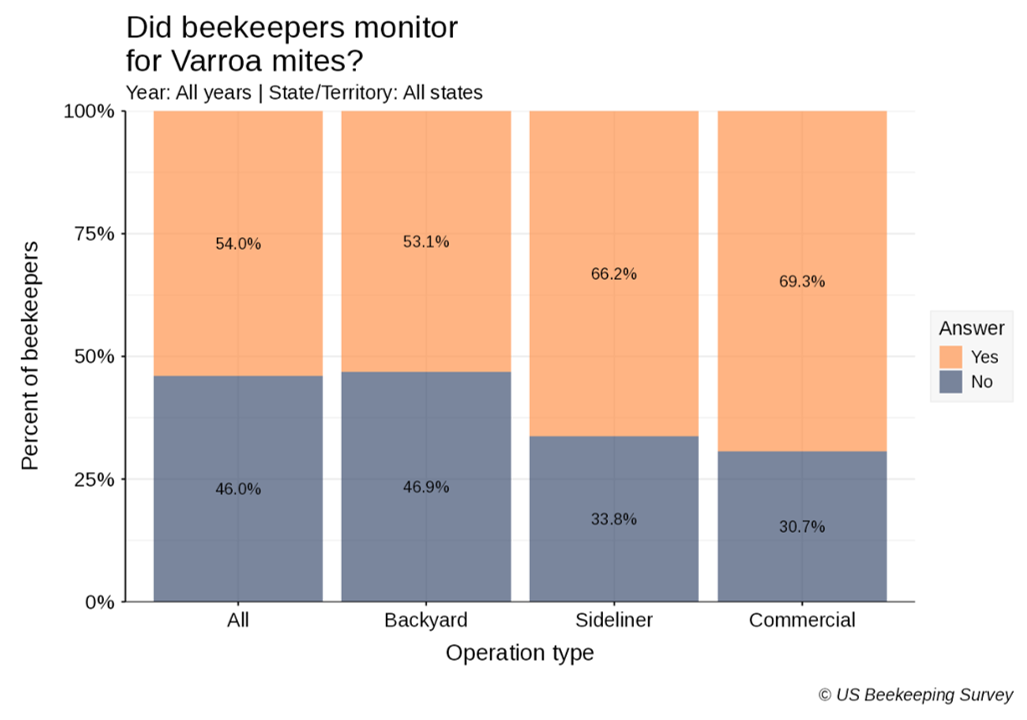
Proportion of beekeepers that monitored for Varroa mites by operation type (backyard: 1–50 colonies, sideliner: 51–500 colonies, and commercial: >500 colonies). Results are shown when 10 or more valid responses per state or territory were recorded.
Frequency of Varroa mite monitoring by beekeepers. Proportions of beekeepers reporting each frequency are shown as points (triangles) with bootstrapped 95% confidence intervals represented by lines. Summer season (yellow) covers April 1 to October 1 for backyard operations, or from the date of the first split to October 1 for sideline and commercial operations. Winter season (blue) covers October 1 to April 1 for all operation types (backyard: 1–50 colonies, sideliner: 51–500 colonies, and commercial: >500 colonies).
Varroa mite monitoring methods used by beekeepers. Proportions of beekeepers reporting each method are shown as points (triangles) with bootstrapped 95% confidence intervals represented by lines. Summer season (yellow) covers April 1 to October 1 for backyard operations, or from the date of the first split to October 1 for sideline and commercial operations. Winter season (blue) covers October 1 to April 1 for all operation types (backyard: 1–50 colonies, sideliner: 51–500 colonies, and commercial: >500 colonies).
- Year: The end year of the survey period, running from 1 April to the next 1 April.
- Operation type: The type of operation run by the beekeeper based on the number of managed colonies. Backyard: managing up to 50 colonies; Sideliner: managing 51-500 colonies; and Commercial: managing >500 colonies.
- State: The country, state, or territory from which the data originate. Multistate operations were counted in each state in which they reported owning colonies but were also reported as a separate subgroup. Non-continental USA: American Samoa, Commonwealth of the Northern Mariana Islands, Guam, Federated States of Micronesia, Hawaii, Puerto Rico, Republic of the Marshall Islands, Republic of Palau and the U.S. Virgin Islands.
- Median: The middle value of the data when ordered low to high.
- Respondents: The total number of respondents that answered the relevant survey question.
- Year: The end year of the survey period, running from 1 April to the next 1 April.
- Operation type: The type of operation run by the beekeeper based on the number of managed colonies. Backyard: managing up to 50 colonies; Sideliner: managing 51-500 colonies; and Commercial: managing >500 colonies.
- State: The country, state, or territory from which the data originate. Multistate operations were counted in each state in which they reported owning colonies but were also reported as a separate subgroup. Non-continental USA: American Samoa, Commonwealth of the Northern Mariana Islands, Guam, Federated States of Micronesia, Hawaii, Puerto Rico, Republic of the Marshall Islands, Republic of Palau and the U.S. Virgin Islands.
- Answer: The beekeepers' answer to the relevant survey question. May be the practice or product used to control for Varroa, the reason to or not to treat for Varroa (trigger), etc.
- Respondents: The total number of respondents that answered the relevant survey question.
- Percentage: The percentage of respondents that chose the answer out of the total number of respondents.
Download Plot
Reported reasons that triggered beekeepers to monitor for Varroa mites. Proportions of beekeepers reporting each trigger are shown as points (triangles) with bootstrapped 95% confidence intervals represented by lines. Summer season (yellow) covers April 1 to October 1 for backyard operations, or from the date of the first split to October 1 for sideline and commercial operations. Winter season (blue) covers October 1 to April 1 for all operation types (backyard: 1–50 colonies, sideliner: 51–500 colonies, and commercial: >500 colonies).
Reported reasons that triggered beekeepers to not monitor for Varroa mites. Proportions of beekeepers reporting each trigger are shown as points (triangles) with bootstrapped 95% confidence intervals represented by lines. Summer season (yellow) covers April 1 to October 1 for backyard operations, or from the date of the first split to October 1 for sideline and commercial operations. Winter season (blue) covers October 1 to April 1 for all operation types (backyard: 1–50 colonies, sideliner: 51–500 colonies, and commercial: >500 colonies).
- Year: The end year of the survey period, running from 1 April to the next 1 April.
- Operation type: The type of operation run by the beekeeper based on the number of managed colonies. Backyard: managing up to 50 colonies; Sideliner: managing 51-500 colonies; and Commercial: managing >500 colonies.
- State: The country, state, or territory from which the data originate. Multistate operations were counted in each state in which they reported owning colonies but were also reported as a separate subgroup. Non-continental USA: American Samoa, Commonwealth of the Northern Mariana Islands, Guam, Federated States of Micronesia, Hawaii, Puerto Rico, Republic of the Marshall Islands, Republic of Palau and the U.S. Virgin Islands.
- Answer: The beekeepers' answer to the relevant survey question. May be the practice or product used to control for Varroa, the reason to or not to treat for Varroa (trigger), etc.
- Respondents: The total number of respondents that answered the relevant survey question.
- Percentage: The percentage of respondents that chose the answer out of the total number of respondents.
Download Plot
Percentage of beekeepers monitoring colonies for Varroa mites over time, by operation type (backyard: 1–50 colonies, sideliner: 51–500 colonies, and commercial: >500 colonies). Proportions are calculated within the subset of beekeepers who reported monitoring their colonies and within operation types that are color-coded. Only quantitative measures that involve counting mites are considered as a monitoring event (i.e. using an alcohol/soapy wash, sugar shake, sticky board, counting mites in brood cells).
Number of Varroa mite monitoring events (median) over time, by operation type (backyard: 1–50 colonies, sideliner: 51–500 colonies, and commercial: >500 colonies). The median is calculated within the subset of beekeepers who reported monitoring their colonies. Only quantitative measures that involve counting mites are considered as a monitoring event (i.e. using an alcohol/soapy wash, sugar shake, sticky board, counting mites in brood cells). Operation types are color-coded.
Percentage of beekeepers using different Varroa mite monitoring methods over time, by operation type (backyard: 1–50 colonies, sideliner: 51–500 colonies, and commercial: >500 colonies). Proportions are calculated within the subset of beekeepers who reported monitoring their colonies. Only quantitative measures that involve counting mites are considered as a monitoring event (i.e. using an alcohol/soapy wash, sugar shake, sticky board, counting mites in brood cells). Methods are color-coded. Since beekeepers may select more than one method, cumulative percentages may exceed 100%. Not all response options were available to respondents in all survey years.
Percentage of beekeepers reporting reasons for not monitoring colonies for Varroa mites over time, by operation type (backyard: 1–50 colonies, sideliner: 51–500 colonies, and commercial: >500 colonies). Proportions are calculated within the subset of beekeepers who reported not monitoring their colonies. Reasons are color-coded. Not all response options were available to respondents in all survey years.
- Year: The end year of the survey period, running from 1 April to the next 1 April.
- State: The country, state, or territory from which the data originate. Multistate operations were counted in each state in which they reported owning colonies but were also reported as a separate subgroup. Non-continental USA: American Samoa, Commonwealth of the Northern Mariana Islands, Guam, Federated States of Micronesia, Hawaii, Puerto Rico, Republic of the Marshall Islands, Republic of Palau and the U.S. Virgin Islands.
- Operation type: The type of operation run by the beekeeper based on the number of managed colonies. Backyard: managing up to 50 colonies; Sideliner: managing 51-500 colonies; and Commercial: managing >500 colonies.
- Median: The middle value of the data when ordered low to high.
- Respondents: The total number of respondents that answered the relevant survey question.
- Year: The end year of the survey period, running from 1 April to the next 1 April.
- State: The country, state, or territory from which the data originate. Multistate operations were counted in each state in which they reported owning colonies but were also reported as a separate subgroup. Non-continental USA: American Samoa, Commonwealth of the Northern Mariana Islands, Guam, Federated States of Micronesia, Hawaii, Puerto Rico, Republic of the Marshall Islands, Republic of Palau and the U.S. Virgin Islands.
- Operation type: The type of operation run by the beekeeper based on the number of managed colonies. Backyard: managing up to 50 colonies; Sideliner: managing 51-500 colonies; and Commercial: managing >500 colonies.
- Answer: The beekeepers' answer to the relevant survey question. May be the practice or product used to control for Varroa, the reason to or not to treat for Varroa (trigger), etc.
- Respondents: The total number of respondents that answered the relevant survey question.
- Percentage: The percentage of respondents that chose the answer out of the total number of respondents.
To cite information visualized by the App, use: US Beekeeping Survey, https://aub.ie/us-beekeeping-survey-app
Data source: US Beekeeping Survey
Data curation: N Steinhauer, Z Beneduci, A Giacobino
App designed by: Z Beneduci, A Giacobino, N Steinhauer, G Williams
Last updated 31 March 2026
© US Beekeeping Survey
Download Plot
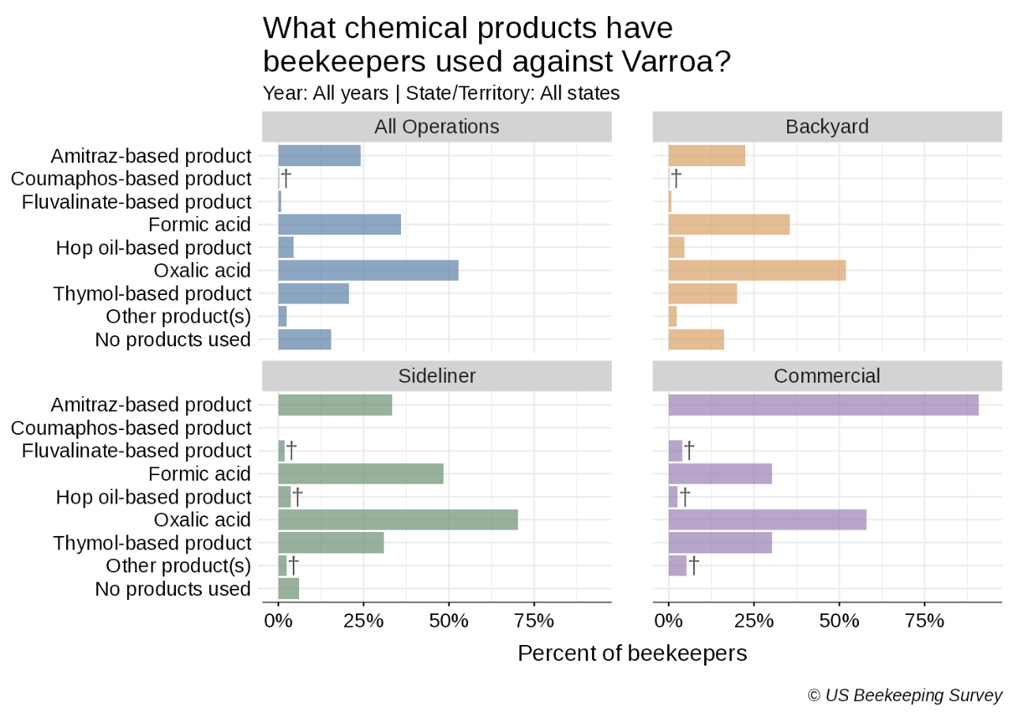
Percentage of beekeepers using chemical products to control Varroa mites, faceted by operation type (backyard: 1–50 colonies, sideliner: 51–500 colonies, and commercial: >500 colonies). Proportions are calculated within the subset of beekeepers who reported treating their colonies and within operation types that are color-coded. Daggers (†) denote small sample groups (<10 respondents). Since beekeepers may select more than one method, cumulative percentages may exceed 100%.
Percentage of beekeepers using non-chemical practices to control Varroa mites, faceted by operation type (backyard: 1–50 colonies, sideliner: 51–500 colonies, and commercial: >500 colonies). Proportions are calculated within operation types that are color-coded. Daggers (†) denote small sample groups (<10 respondents). Since beekeepers may select more than one method, cumulative percentages may exceed 100%.
- Year: The end year of the survey period, running from 1 April to the next 1 April.
- Operation type: The type of operation run by the beekeeper based on the number of managed colonies. Backyard: managing up to 50 colonies; Sideliner: managing 51-500 colonies; and Commercial: managing >500 colonies.
- State: The country, state, or territory from which the data originate. Multistate operations were counted in each state in which they reported owning colonies but were also reported as a separate subgroup. Non-continental USA: American Samoa, Commonwealth of the Northern Mariana Islands, Guam, Federated States of Micronesia, Hawaii, Puerto Rico, Republic of the Marshall Islands, Republic of Palau and the U.S. Virgin Islands.
- Answer: The beekeepers' answer to the relevant survey question. May be the practice or product used to control for Varroa, the reason to or not to treat for Varroa (trigger), etc.
- Respondents: The total number of respondents that answered the relevant survey question.
- Percentage: The percentage of respondents that chose the answer out of the total number of respondents.
Download Plot
Percentage of beekeepers reporting reasons for treating their colonies against Varroa mites, by operation type (backyard: 1–50 colonies, sideliner: 51–500 colonies, and commercial: >500 colonies). Proportions are calculated within the subset of beekeepers who reported treating their colonies and within operation types that are color-coded. Daggers (†) denote small sample groups (<10 respondents). Since beekeepers may select more than one method, cumulative percentages may exceed 100%.
Percentage of beekeepers reporting reasons for not treating their colonies against Varroa mites, by operation type (backyard: 1–50 colonies, sideliner: 51–500 colonies, and commercial: >500 colonies). Proportions are calculated within the subset of beekeepers who reported not treating their colonies and within operation types that are color-coded. Daggers (†) denote small sample groups (<10 respondents). Since beekeepers may select more than one method, cumulative percentages may exceed 100%.
- Year: The end year of the survey period, running from 1 April to the next 1 April.
- Operation type: The type of operation run by the beekeeper based on the number of managed colonies. Backyard: managing up to 50 colonies; Sideliner: managing 51-500 colonies; and Commercial: managing >500 colonies.
- State: The country, state, or territory from which the data originate. Multistate operations were counted in each state in which they reported owning colonies but were also reported as a separate subgroup. Non-continental USA: American Samoa, Commonwealth of the Northern Mariana Islands, Guam, Federated States of Micronesia, Hawaii, Puerto Rico, Republic of the Marshall Islands, Republic of Palau and the U.S. Virgin Islands.
- Answer: The beekeepers' answer to the relevant survey question. May be the practice or product used to control for Varroa, the reason to or not to treat for Varroa (trigger), etc.
- Respondents: The total number of respondents that answered the relevant survey question.
- Percentage: The percentage of respondents that chose the answer out of the total number of respondents.
Download Plot
Percentage of beekeepers using chemical products to control Varroa mites over time, by operation type (backyard: 1–50 colonies, sideliner: 51–500 colonies, and commercial: >500 colonies). Chemical products are color-coded.
Percentage of beekeepers using non-chemical practices to control Varroa mites over time, by operation type (backyard: 1–50 colonies, sideliner: 51–500 colonies, and commercial: >500 colonies). Non-chemical practices are color-coded.
Percentage of beekeepers reporting reasons for treating their colonies against Varroa mites over time, by operation type (backyard: 1–50 colonies, sideliner: 51–500 colonies, and commercial: >500 colonies). Proportions are calculated within the subset of beekeepers who reported treating their colonies. Reasons for treating against Varroa are color-coded.
Percentage of beekeepers reporting reasons for not treating their colonies against Varroa mites over time, by operation type (backyard: 1–50 colonies, sideliner: 51–500 colonies, and commercial: >500 colonies). Proportions are calculated within the subset of beekeepers who reported not treating their colonies. Reasons for not treating against Varroa are color-coded.
- Year: The end year of the survey period, running from 1 April to the next 1 April.
- Operation type: The type of operation run by the beekeeper based on the number of managed colonies. Backyard: managing up to 50 colonies; Sideliner: managing 51-500 colonies; and Commercial: managing >500 colonies.
- State: The country, state, or territory from which the data originate. Multistate operations were counted in each state in which they reported owning colonies but were also reported as a separate subgroup. Non-continental USA: American Samoa, Commonwealth of the Northern Mariana Islands, Guam, Federated States of Micronesia, Hawaii, Puerto Rico, Republic of the Marshall Islands, Republic of Palau and the U.S. Virgin Islands.
- Answer: The beekeepers' answer to the relevant survey question. May be the practice or product used to control for Varroa, the reason to or not to treat for Varroa (trigger), etc.
- Respondents: The total number of respondents that answered the relevant survey question.
- Percentage: The percentage of respondents that chose the answer out of the total number of respondents.
To cite information visualized by the App, use: US Beekeeping Survey, https://aub.ie/us-beekeeping-survey-app
Data source: US Beekeeping Survey
Data curation: N Steinhauer, Z Beneduci, A Giacobino
App designed by: Z Beneduci, A Giacobino, N Steinhauer, G Williams
Last updated 31 March 2026
© US Beekeeping Survey